DNS troubleshooting: nslookup, dig, DoH
· 7 min read
DNS issues are among the most common and hardest-to-diagnose causes of outages. Practical tools: nslookup, dig and DNS-over-HTTPS.
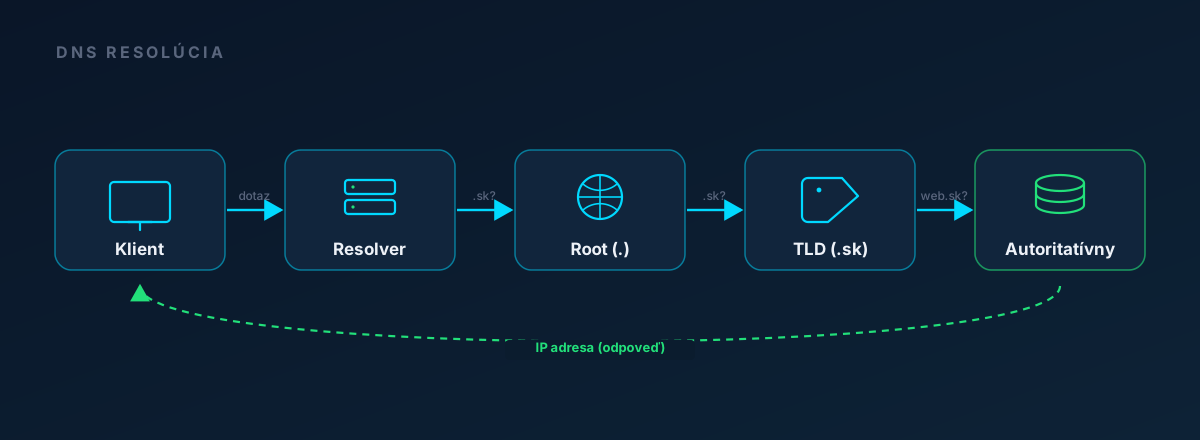
Most common DNS problems
- Domain registration expired - the entire DNS stops working.
- Wrong A/AAAA record - forgotten after a server migration.
- Missing CNAME / MX - the website works, but email does not.
- TTL not lowered before a planned change - provider caches still serve the old data.
- DNSSEC error - validators reject unsigned or incorrectly signed records.
- Geo-DNS failure - a resolver from a certain region gets the wrong answer.
nslookup: the simplest command
Available on all OS without installation. It uses the system default DNS server, but you can specify one explicitly as the second argument.
$ nslookup epulz.io
Server:    127.0.0.53
Address:   127.0.0.53#53

Non-authoritative answer:
Name:      epulz.io
Address:   87.197.115.180

# Explicitly use Cloudflare DNS
$ nslookup epulz.io 1.1.1.1

# Specific record type
$ nslookup -type=MX gmail.com 8.8.8.8
$ nslookup -type=TXT _dmarc.epulz.io 1.1.1.1
dig: detailed DNS query for Unix
dig (Domain Information Groper) is significantly more detailed and flexible. It is part of the bind-utils or dnsutils package.
$ dig epulz.io

;; QUESTION SECTION:
;epulz.io.                      IN      A

;; ANSWER SECTION:
epulz.io.               300     IN      A       87.197.115.180

;; Query time: 12 msec
;; SERVER: 127.0.0.53#53(127.0.0.53)
;; WHEN: ...
Key fields:
TTL(300) = the number of seconds the resolver may cache the answer.ANSWER SECTION= the actual result.SERVER= which DNS resolver answered.Query time= duration - useful when debugging slow DNS.
Practical commands
# Concise answer (only IP)
$ dig +short epulz.io
87.197.115.180

# All records
$ dig epulz.io ANY

# Trace the whole DNS hierarchy (from root nameservers)
$ dig +trace epulz.io

# Reverse lookup
$ dig -x 87.197.115.180

# Specific resolver
$ dig @8.8.8.8 epulz.io
$ dig @1.1.1.1 epulz.io
$ dig @9.9.9.9 epulz.io

# DNSSEC validation
$ dig +dnssec epulz.io
DNS-over-HTTPS (DoH): when you don't have UDP/53
In some networks (corporate firewalls, mobile data with blocking) the traditional DNS port 53 is blocked. DoH wraps DNS queries into HTTPS requests, so they go through everywhere port 443 works.
# Cloudflare DoH endpoint
$ curl -s "https://cloudflare-dns.com/dns-query?name=epulz.io&type=A" \
       -H "Accept: application/dns-json" | jq

# Google DoH
$ curl -s "https://dns.google/resolve?name=epulz.io&type=MX" | jq
We also have an online DoH client with a clean UI at /tools/dns-lookup - no installation required.
Procedure for "the domain doesn't work"
- Check the registration.
whois yourdomain.comor via the registrar. If it expired, nothing else can be fixed. - Check the NS records.
dig NS yourdomain.com @8.8.8.8. Are the nameservers responsible for the domain returned? Do they match what's in the registrar panel? - Check the A record.
dig yourdomain.com @8.8.8.8. Does it return the right IP? - Test from an external network (mobile data, VPN, online tool). You may have the old data cached yourself.
- Check the TTL. If you just changed a record, wait at least the original TTL (1 to 24 hours by default).
- Check DNSSEC. If you use it, the signature chain may be broken.
dig +dnssec yourdomain.comshows theadflag on success.
DNS propagation: how long does it take?
"DNS propagation" is a slightly misleading term. DNS doesn't propagate toward you - your resolvers download the answer and cache it according to the TTL. Only after the TTL expires do they try a new query.
Practical consequences:
- Planning a migration? Lower the TTL to 60 to 300 seconds at least 48 hours in advance.
- The old IP stays cached for some clients long after the change. Don't shut down the old server immediately.
- Cloud providers (Cloudflare, AWS Route 53) support short TTL values and fast change propagation, but the end client still has to wait for the TTL of its own resolver.
Conclusion
DNS is the infrastructure glue everyone takes for granted - until it stops working. Regular monitoring of DNS records (A, NS, MX, their TTL and DNSSEC validation) reveals the problem before a customer reports it by phone.
Monitoring of DNS and WHOIS expiry
ePulz.io tracks A/AAAA/MX/NS records and domain registration expiry. 7 days free.
Try ePulz.io free - 7 days, no credit card needed.
Create account